








Dictami for Mac
- Trial version
- 4
- V1.2.28
Download for Mac
View an ad to download for free

- Yuliy Metelskiy
Offline voice dictation for Mac. Hold a key, speak, text appears in any app. 30 languages.
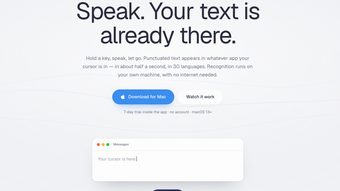
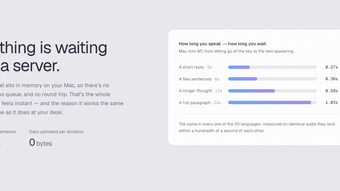
Turn your voice into instant text anywhere on your Mac and get more done with less typing. Dictami converts spoken words into editable text in about half a second, so you can write emails, notes, or messages without leaving the app you're using.
Typing can slow you down, cause strain, and interrupt your workflow. Dictami solves that by letting you hold a key, speak naturally, and see your words appear where you need them. No waiting for uploads, no copying and pasting — just fast, reliable dictation that stays on your machine.
- Hold a key and speak — Press and hold a shortcut key to dictate, and see text appear in any app in roughly 0.5 seconds. This keeps your focus in the active window and speeds up composition.
- Works fully offline — All speech recognition happens on your Mac, so your voice data never leaves your device. Enjoy stronger privacy and predictable performance without relying on internet connectivity.
- Supports 30 languages — Dictami handles a wide range of languages, making it useful for multilingual users, international work, or learning new languages.
What makes Dictami stand out is the mix of speed, convenience, and privacy. Many dictation tools require an internet connection or route audio through cloud services, which can be slow and raise privacy concerns. Dictami keeps everything local and tuned for immediate insertion into whatever app you’re using, so it feels like a natural extension of your keyboard. The low latency means your spoken ideas become editable text almost instantly, which keeps your thoughts flowing and reduces the friction of stopping to type.
Dictami is especially well suited for power users who juggle many apps and need rapid input, and for home users who want a simple, private way to dictate messages, notes, or long-form content. If you value speed, privacy, and the ability to use dictation across any macOS application, Dictami will feel like a productivity boost from day one.
Setup is minimal: pick a hotkey, choose your language, and start speaking. Because it runs entirely on your Mac, Dictami works offline without surprises and respects your privacy by design. If you want a fast, private, and versatile dictation tool that integrates seamlessly into your existing workflow, Dictami makes speaking your text effortless.
Loading…

App specs
Developer
- Yuliy Metelskiy
License
Trial version
Version
1.2.28
Latest update
Platform
Mac
OS
macOS 10.15
Language
English
Size
14.17 MB
Dictami for Mac
- Trial version
- 4
- V1.2.28
Download for Mac
View an ad to download for free
User reviews about Dictami
Have you tried Dictami? Be the first to leave your opinion!
Add reviewTop downloads Keyboards for Mac
Top downloads Keyboards for Mac
Top downloads Keyboards for Mac
Related topics about Dictami
Latest articles

Tesla FSD moves closer in Europe: Germany backs it, but the name must change
Xbox names Maria Angelidou-Smith as Mojang CEO amid Minecraft franchise push

Marvel’s Wolverine sold 756,000 boxed copies in a month: physical still matters

Dexter: Resurrection season 2 is official: Eric Stonestreet’s Rapunzel returns

Arc Raiders gets Frozen Trail 2.0 now: open the map while downed
Laws concerning the use of this software vary from country to country. We do not encourage or condone the use of this program if it is in violation of these laws. Softonic may receive a referral fee if you click or buy any of the products featured here.